How to create a TGR
What is a TGR?
TGRs are Token Gating Rules, the rules that determine which roles a member will be assigned based on the token-related criteria defined by the community admin.
For example, a TGR may grant access to a "VIP" role for members who hold a certain number of tokens.
Learn more about the different TGR types and Collab.Land's supported blockchains in the Key Features.
How to Create a TGR
To create a TGR in Discord, follow these steps:
Log in to the Command Center at https://cc.collab.land using Discord.
From the left panel, select the server in which you would like to create the TGR. Then, click on "TGRs".
Click the "+ Select Role" button and choose the Discord role you would like to use for your TGR.
You will be taken to the TGR configuration page. Fill in the fields to create your TGR. If any information provided is incorrect, an error message will appear. The fields include:
Description (optional): A description of your TGR that will only be displayed in the CC for reference purposes.
Chain type: The blockchain network that the token for this TGR is on.
See the full list of Collab.Land-supported chains and corresponding token types.
Token type: The type of token used for the TGR.
Address: The contract address of your token.
Token ID (optional): Give the specific
tokenIds of the tokens required to obtain the role.Balance: The minimum and maximum (optional) amount of tokens required to obtain the role.
Attributes (conditional): For specific tokens, such as NFTs, you can add metadata conditions that must be met in order for the member to receive the role. If your NFT contains metadata traits and values, you can enter them by clicking on the "Attributes" button and then "Add metadata".
If you need to start over, click "Reset". This action is not reversible.
Once you have filled in the fields, click "Save" to create your TGR.
If you are using the tokenId field, you must provide token IDs separated by commas, with no spaces. Using ranges with - are supported as well.
Supported tokenId formats:
Range:
11-99List:
1,2,3,4List combined with range(s):
1,2,42-69,90,101-105
Congratulations, you've created a TGR!
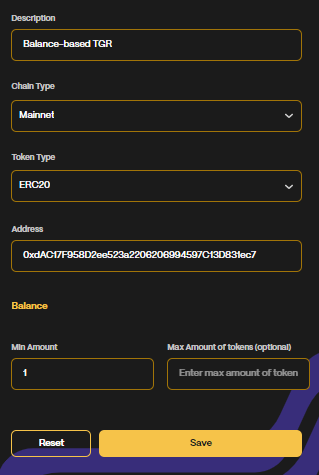
Create a Balance-Based TGR
Follow the normal steps of creating a TGR as listed above
Set the minimum amount of tokens (required)
Set the maximum amount of tokens (not required).
Click “Save”
Your balance-based TGR is ready! A complete balance-based TGR should look like this:
Create a Metadata-Based TGR
Follow the normal steps of creating a TGR as listed above
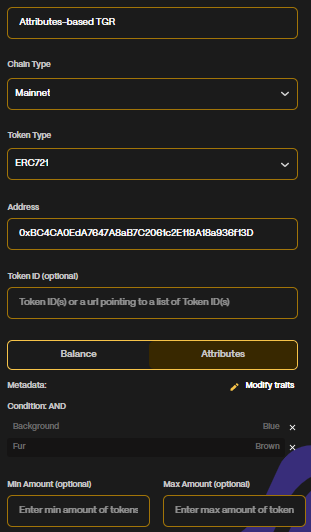
Since you have chosen to create an Attributes-based TGR, when you picked the Token Type, an “Attributes” button has appeared next to the “Balance” option.
The "Attributes" button will only appear if you are using an NFT TGR type. Selected type must be ERC721, ERC1155, or equivalent NFT standard.
Select “Attributes”.
Click on the “+ Add Metadata” button.
A window will appear, allowing you to enter the
Traitand itsValue.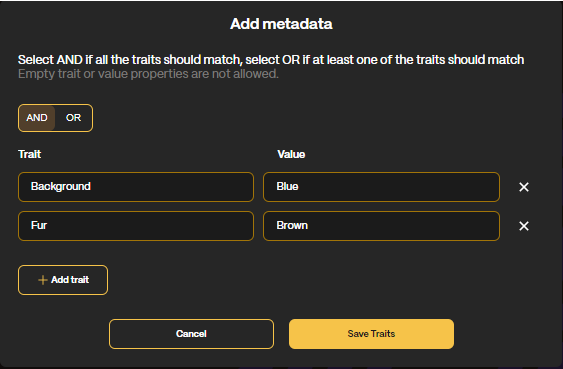
Metadata-based TGRs must be EXACT matches to the Traits and Values specified in the contract's metadata.
If you want to add multiple Traits:
Select AND if all the traits should match. If you choose the AND option (default) then the member will have to hold one NFT with all of the trait value pairs which have been listed here.
Select OR if at least one of the traits should match. If you choose the OR option, the member will have to hold one NFT with at least one of the trait value pairs which have been listed.
Click on the “Add Trait” button.
Click “Save”
Your Attributes-based TGR is ready! This is what it should look like:
How to find NFT metadata traits
coming soon